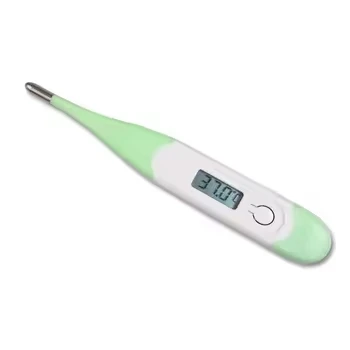
1. Preparation
Clean the thermometer: Before using, clean the tip of the thermometer with rubbing alcohol or an antiseptic wipe. This helps prevent the spread of germs.
Check the battery: Ensure that the thermometer has sufficient battery power. If the battery is low, replace it to avoid inaccurate readings.
2. Turning On the Thermometer
Press the power button: Most digital thermometers have a power button. Press this button to turn the thermometer on. The display should light up and show a reading.
Wait for the initial reading: Some thermometers will display a default or last reading when turned on. Wait for the thermometer to reset to zero or a default state.
3. Taking the Temperature
There are several common methods for taking temperature with a digital thermometer:
a.Oral Measurement
Place the thermometer: Place the tip of the thermometer under the tongue, towards the back of the mouth. Make sure the tip is fully under the tongue.
Close the lips: Close the lips around the thermometer and keep the mouth closed. Do not bite on the thermometer.
Wait for the reading: The thermometer will beep or flash when it has recorded the temperature. This usually takes about 30 seconds to a minute.
b. Rectal Measurement (for infants or young children)
Lubricate the tip: Apply a small amount of lubricant (such as KY Jelly) to the tip of the thermometer.
Insert the thermometer: Gently insert the thermometer into the rectum about 1/2 to 1 inch. Hold it in place.
Wait for the reading: The thermometer will beep or flash when it has recorded the temperature. This usually takes about 30 seconds to a minute.
c. Axillary Measurement (underarm)
Place the thermometer: Place the tip of the thermometer in the armpit, making sure it is fully covered by skin.
Hold the arm down: Hold the arm against the body to keep the thermometer in place.
Wait for the reading: The thermometer will beep or flash when it has recorded the temperature. This usually takes about 30 seconds to a minute.
4. Reading the Temperature
Check the display: Once the thermometer beeps or flashes, read the temperature on the display. Make sure to read it immediately, as some thermometers may turn off automatically after a short period.
Record the temperature: Write down the temperature reading for future reference, especially if tracking a fever or illness.
5. Turning Off the Thermometer
Press the power button: Press the power button again to turn off the thermometer. This helps conserve battery life.
6. Cleaning and Storage
Clean the thermometer: After use, clean the tip of the thermometer again with rubbing alcohol or an antiseptic wipe.
Store the thermometer: Store the thermometer in a cool, dry place, away from direct sunlight and extreme temperatures.
Tips for Accurate Readings
Avoid eating or drinking: Do not eat or drink anything hot or cold for at least 15 minutes before taking an oral temperature.
Wait after exercise: If you have been exercising, wait at least 15 minutes before taking a temperature reading.
Follow manufacturer's instructions: Always follow the specific instructions provided by the manufacturer for your particular digital thermometer, as there may be slight variations in operation.